How to Use a Tennis Ball Machine: Beginner's Guide
If you're new to tennis ball machines, learning how to operate one properly can significantly enhance your practice sessions. Whether you're renting for the first time or just getting started, this guide will walk you through everything you need to know about using a tennis ball machine effectively.
The first part of this guide covers the fundamentals that apply to any machine — controls, setup, drills and safety. Our rental fleet currently includes two different machines: the Lobster Elite Liberty, a dial-and-knob machine, and the Pusun PT-Smart, a smartphone-app-controlled machine. Because they are operated quite differently, you'll find model-specific notes and downloadable manuals for each further down the page.
Understanding the Basic Controls
Most modern tennis ball machines feature intuitive controls and displays. Here are the main adjustments you'll encounter:
- Speed Control: Adjustable from roughly 10 to 110+ km/h (about 6 to 70+ mph). Beginners should start at 40-60 km/h (about 25-37 mph, a comfortable practice speed)
- Spin Control: Options include topspin, backspin, and flat shots. Each modifies ball trajectory and bounce characteristics
- Oscillation: Side-to-side movement that varies the ball placement. Helps develop footwork and court positioning
- Feed Rate: Controls how frequently balls are launched. Ranges from slow (one ball every 3-5 seconds) to rapid (continuous feeding)
- Elevation/Angle: Adjusts the trajectory angle, simulating different types of opponents and play scenarios
Step-by-Step Setup Guide
Here's how to properly set up and start using a tennis ball machine:
- Load the Ball Hopper: Fill the hopper with pressureless tennis balls (these are essential for machine use). Most machines hold 100-150 balls.
- Power On the Machine: Turn on the power switch and allow the machine to initialize. Most machines have a warm-up period of 10-20 seconds.
- Set Your Initial Speed: For beginners, start with a slow speed (40-50 km/h, about 25-31 mph). This allows you to focus on technique without over-pressuring yourself.
- Disable Advanced Features: Turn off oscillation and keep spin settings simple initially. Add complexity once you're comfortable.
- Select Feed Rate: Choose a moderate feed rate (one ball every 2 seconds). This gives you time to recover between shots.
- Test a Few Balls: Start the machine and hit a few shots to get a feel for the speed and rhythm before committing to a full practice session.
Beginner-Friendly Settings
Here are recommended starting settings for different experience levels:
Complete Beginner
- Speed: 40-50 km/h (25-31 mph, easy controlled pace)
- Spin: Flat or light topspin
- Oscillation: Off or minimal (5-10° arc)
- Feed Rate: Slow (one ball every 3 seconds)
- Focus: Rhythm, footwork, and basic stroke mechanics
Intermediate Player
- Speed: 60-80 km/h (37-50 mph, match-simulation pace)
- Spin: Moderate topspin (machine-dependent)
- Oscillation: Moderate (15-25° arc)
- Feed Rate: Moderate (one ball every 1.5-2 seconds)
- Focus: Court positioning, return consistency, and shot variety
Advanced Player
- Speed: 80-110+ km/h (50-68+ mph, high-intensity)
- Spin: Variable (topspin, backspin, flat shots)
- Oscillation: Wide (30-40° arc) or random
- Feed Rate: Fast (continuous or near-continuous)
- Focus: Match pressure simulation, aggressive baseline play, net approaches
Machine-Specific Notes
The settings above are universal, but the two machines in our fleet are controlled in very different ways. Here's what you need to know for each, along with the official manufacturer manuals to download.
Lobster Elite Liberty (dial & knob control)
The Elite Liberty is a straightforward, all-mechanical machine — everything is set directly on the control panel, with no phone or app required. It's rugged and quick to get going.
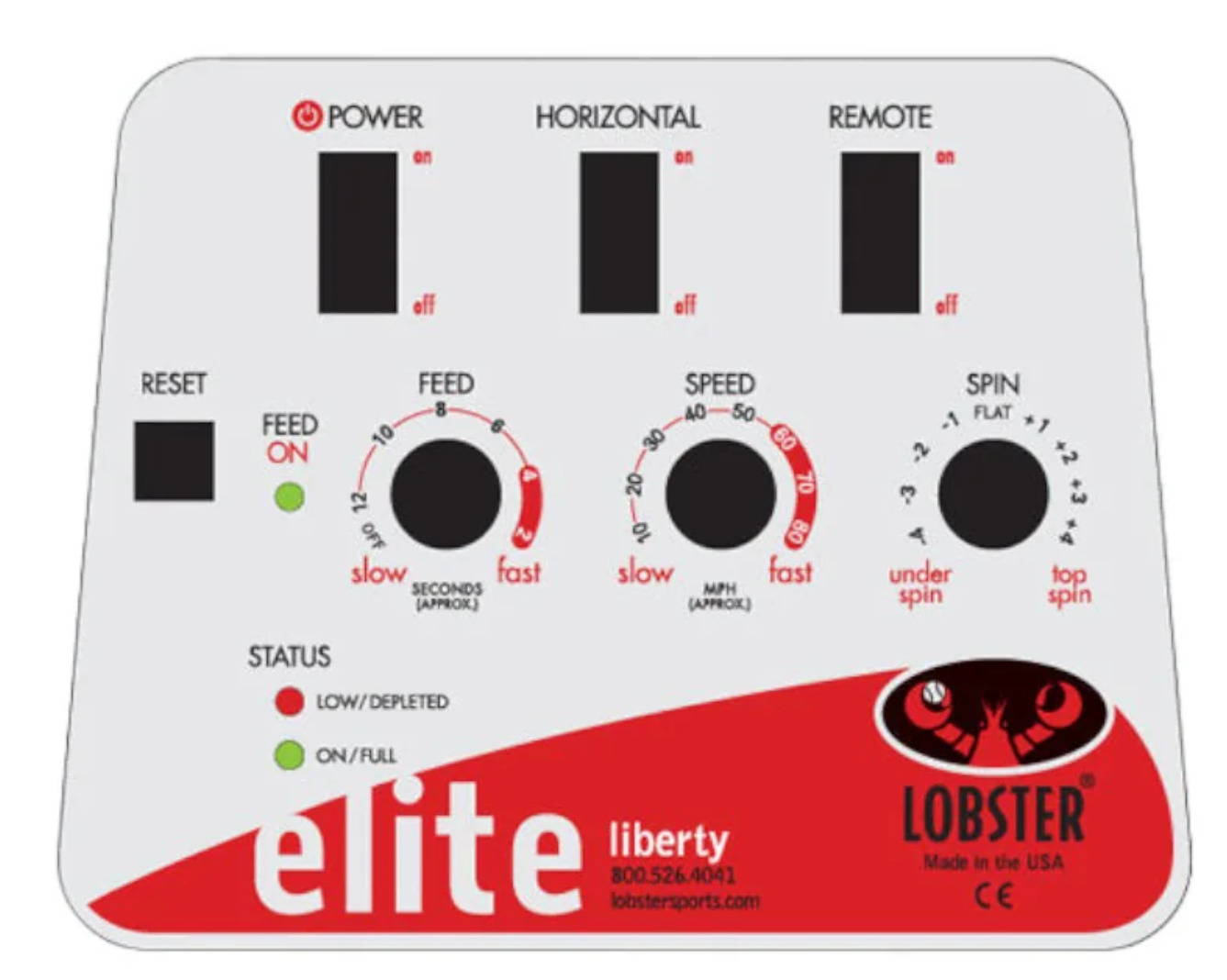
- Panel controls: a Power switch, a Horizontal switch (turns the random left-to-right oscillation on and off), a Feed knob (adjustable from about 2 to 12 seconds between balls — turn it fully counter-clockwise to stop the feed), a Speed knob (roughly 10-80 mph / 16-129 km/h), and a Spin knob that runs from underspin (backspin) through flat in the middle to topspin.
- Adjusting elevation (trajectory height): this one is easy to miss. The elevation is set by a hand crank/knob on the lower-right side of the red case — pull the knob out, then twist it. Turn clockwise to raise the ball trajectory and counter-clockwise to lower it. There's an elevation indicator on the front of the case so you can note and return to a setting you like.
- Oscillation & repositioning: the Horizontal switch gives a random sweep. To re-aim the machine you can simply switch the sweep on, let it rotate to the direction you want, then switch it off — no need to lift the machine.
- Court placement: align the white line marker on the base of the machine with the baseline at the centre mark. Moving it closer to the net narrows the sweep; moving it back widens it.
- Battery-saving tip: to pause between drills, turn the Feed off rather than the Power — it conserves the battery while keeping the machine ready.
- Optional remote: if the handheld remote is in use, flip the Remote switch on and you can start/stop the feed and sweep from the far side of the court.
Pusun PT-Smart (smartphone app control)
The PT-Smart is a smart machine — the most convenient and full-featured way to run it is through its free app over Bluetooth. It also comes with a simple remote, but the app is where all the drill modes and fine control live.
- Connecting via the app (recommended): switch the machine on, then on your phone download the PUSUN Tennis app, enable Bluetooth and location services, open the app and connect to the machine over Bluetooth. Pick a training mode, then tap Start.
- Live adjustments: three sliders — Frequency (feed rate), Speed and Spin — run along the bottom of the app screen and can be changed at any time while the machine is feeding.
- Built-in drill modes: this is the PT-Smart's biggest advantage over a dial machine. Choose from Fixed, Cross, Horizontal, Vertical, Volley, Smash, Random, Primary (a gentle beginner feed), Moon ball (high looping balls), and Program — where you tap up to 20 points on a grid to build your own repeating pattern.
- About the remote: the included remote is handy for basic start/stop, but it's limited — note that when the machine is started from the remote it runs at a lower speed. For full speed and control, drive it from the app.
- Power: the panel itself is simple — a power indicator, an ON/OFF switch and a DC port. The machine runs from an external battery pack connected with the dedicated power cord. When charging, always plug the charger into the wall before connecting it to the battery, and never run the machine while it's charging.
- Capacity & feed: it holds 100+ balls and feeds every 1.8-8.8 seconds depending on the Frequency setting.
📄 Download the Full Manuals
For complete details — safety information, charging, troubleshooting and specifications — download the official manufacturer manual for your machine:
Essential Operating Tips
- Stay Focused: Keep your eyes on the ball from launch to contact. Mental engagement is crucial for improvement.
- Maintain Court Distance: Position yourself 6-8 meters from the machine for safety and optimal practice conditions.
- Adjust Gradually: Change one setting at a time. This lets you understand how each control affects your practice.
- Track Your Progress: Note which settings work best for specific skills you're developing (e.g., "60 km/h / 37 mph with topspin for consistency drills").
- Use Structured Drills: Don't just hit randomly. Practice specific patterns: corner-to-corner, diagonal to diagonal, or fixed placement shots.
- Take Breaks: Tennis ball machines are relentless. Rest between intense sets to maintain focus and prevent fatigue-related technique breakdown.
Safety Precautions
- Keep Hands Clear: Never reach into the ball hopper or feeding mechanism while the machine is running.
- Wear Appropriate Footwear: Use proper tennis shoes with good lateral support to handle rapid direction changes.
- Clear the Court: Ensure no spectators or other players are in the ball flight path.
- Start Slow: Always begin a session at lower speeds before increasing to match-pace intensity.
- Power Down Properly: Turn off the machine at the end of your session and allow it to come to a complete stop.
Effective Practice Drills
Here are proven drills to maximize your tennis ball machine sessions:
Drill 1: Baseline Consistency
Settings: 50 km/h (31 mph), flat shots, no oscillation, 1 ball per 2 seconds
Goal: Hit 20+ consecutive shots within the baseline, focusing on rhythm and depth control.
Drill 2: Wide Court Coverage
Settings: 60 km/h (37 mph), topspin, wide oscillation (30°), 1 ball per 1.5 seconds
Goal: Move side-to-side efficiently and maintain court balance after each shot.
Drill 3: Return of Serve
Settings: 75 km/h (47 mph), backspin or flat, no oscillation, rapid feed (continuous)
Goal: Practice quick reaction times and aggressive return positioning to develop aggressive return mechanics.
Drill 4: Spin Recognition
Settings: 70 km/h (43 mph), alternating topspin and backspin, moderate oscillation, variable feed
Goal: Develop spin recognition skills and adjust your technique based on incoming spin type.
Maintenance & Care Tips
To ensure your rental machine operates smoothly:
- Use only pressureless tennis balls as provided with the rental
- Keep the court clean to prevent debris from interfering with ball feeds
- Don't force any control mechanisms—they're designed for smooth operation
- Report any mechanical issues immediately to the rental provider
- Keep the machine dry; stop using it if it starts raining
Maximizing Your Practice Sessions
Here's how to get the most value from your tennis ball machine rental:
- Plan Your Drills: Before arrival, decide which strokes/skills you'll focus on. This keeps you efficient and purposeful.
- Warm Up Properly: Start with easy settings (40 km/h / 25 mph) for 10 minutes to warm up muscles and get into rhythm.
- Progressive Intensity: Build from easy to challenging drills within a single session. End with high-intensity work while fresh.
- Video Record: Use your phone to record key drills. Review footage to identify technique improvements or persistent issues.
- Stay Hydrated: Tennis ball machine work is intense. Bring plenty of water and take strategic breaks.
- Cool Down: Finish with light, low-speed hitting and stretching to properly recover.
Common Mistakes to Avoid
- Starting Too Fast: Don't jump to high speeds if you're inexperienced. Build up gradually over multiple sessions.
- Ignoring Technique: Don't just swing mindlessly. Each shot should be intentional and focused on a specific aspect of your game.
- Overworking: Tennis balls machines are relentless. Even pros take breaks. Listen to your body and avoid overuse injuries.
- Not Resetting Controls: If settings feel wrong mid-session, stop and adjust settings. A slight adjustment can make a huge difference.
- Skipping the Warm-Up: Don't start immediately at match pace. Your body and mind need proper preparation.
Conclusion
Learning how to use a tennis ball machine properly is the first step to unlocking a powerful training tool. Whether you're beginning your tennis journey or refining advanced techniques, understanding how to operate the controls, set appropriate difficulty levels, and structure effective drills will transform your practice sessions into purposeful, skill-building opportunities.
The key is starting simple, focusing on technique, and gradually increasing complexity as you become comfortable. With consistent, intentional practice using a tennis ball machine, you'll notice significant improvements in consistency, footwork, court positioning, and overall game development.
Ready to experience the benefits of tennis ball machine training? Book your session today and start improving your game with structured, efficient practice.
Next Steps for Your Practice
Once you are comfortable with setup, move into structured drills and booking options.
Ready to Master the Tennis Ball Machine?
Rent a professional machine and start your structured tennis training today